saturnus: classic HP calculators, in your browser or as an app
saturnus emulates the HP 48SX, HP 48GX, HP 49G, HP 38G, HP 39G, HP 40G, HP 42S, HP 27S, HP 17BII, HP 17B, HP 28S and HP 19BII. Open it in your browser, or install the app on Mac, Windows or Linux.
The docs describe each model, every command, the Saturn processor and how to move files to a real calculator.
Open saturnus Download for Mac Download for Windows
Free and open source (MIT). Your ROM and your work stay on your device. No ROMs included.

Twelve calculators
HP's graphing, scientific and business calculators from 1988 to 2000, each running its own ROM. Pick one to read what was new about it.
-
HP 48SX 1990
The 28S's RPL in a case with two card ports, a serial port and infrared. Owners used the serial port to share their programs online.
-
HP 48GX 1993
Input forms and choose lists in every application, and the Equation Library built in: over 300 equations in 15 subjects. HP sold it for about ten years.
-
HP 49G 1999
Computer algebra built in, written mainly by Bernard Parisse, with algebraic or RPN entry. Its ROM sits in flash memory, so you can update it yourself.
-
HP 38G 1995
A graphing calculator for school maths and science, designed with eight teachers. A teacher builds an aplet and beams it to the whole class by infrared.
-
HP 39G 2000
The 38G's successor, with eight times the memory on the same screen. New aplets test hypotheses and explore trigonometry and quadratics.
-
HP 40G 2000
The 39G with the 49G's computer algebra. It trades the infrared for a cable to a PC and to other calculators.
-
HP 42S 1988
It has all the programmable functions of the HP-41, so HP-41 programs run on it. A two-line display, menus, complex numbers, matrices and a solver.
-
HP 27S 1988
HP's first algebraic scientific: menus instead of RPN. A solver for typed equations, statistics, money maths and a clock with appointments, but no programming.
-
HP 17BII 1990
Business maths in RPN or algebraic; with the 19BII, it was the first HP to offer both. Cash flows, bonds, depreciation and a solver for your own formulas.
-
HP 17B 1988
Business maths with menus and prompts: money over time, cash flows, bonds and depreciation. Its solver takes your own equations instead of a program.
-
HP 28S 1988
Symbolic algebra and calculus in a case that opens like a book. It followed the 28C, the first calculator with computer algebra, and has 16 times its memory.
-
HP 19BII 1990
HP's last clamshell: a business calculator with letter keys and a four-line display. Solver, money maths, appointments, text lists and six languages.
What you can do
-
Type and paste RPL
Paste a program and the app types it into the command line, key by key. Your keyboard's letters, digits and Enter go to the calculator; F1 to F6 are the menu keys.
-
Look inside the memory
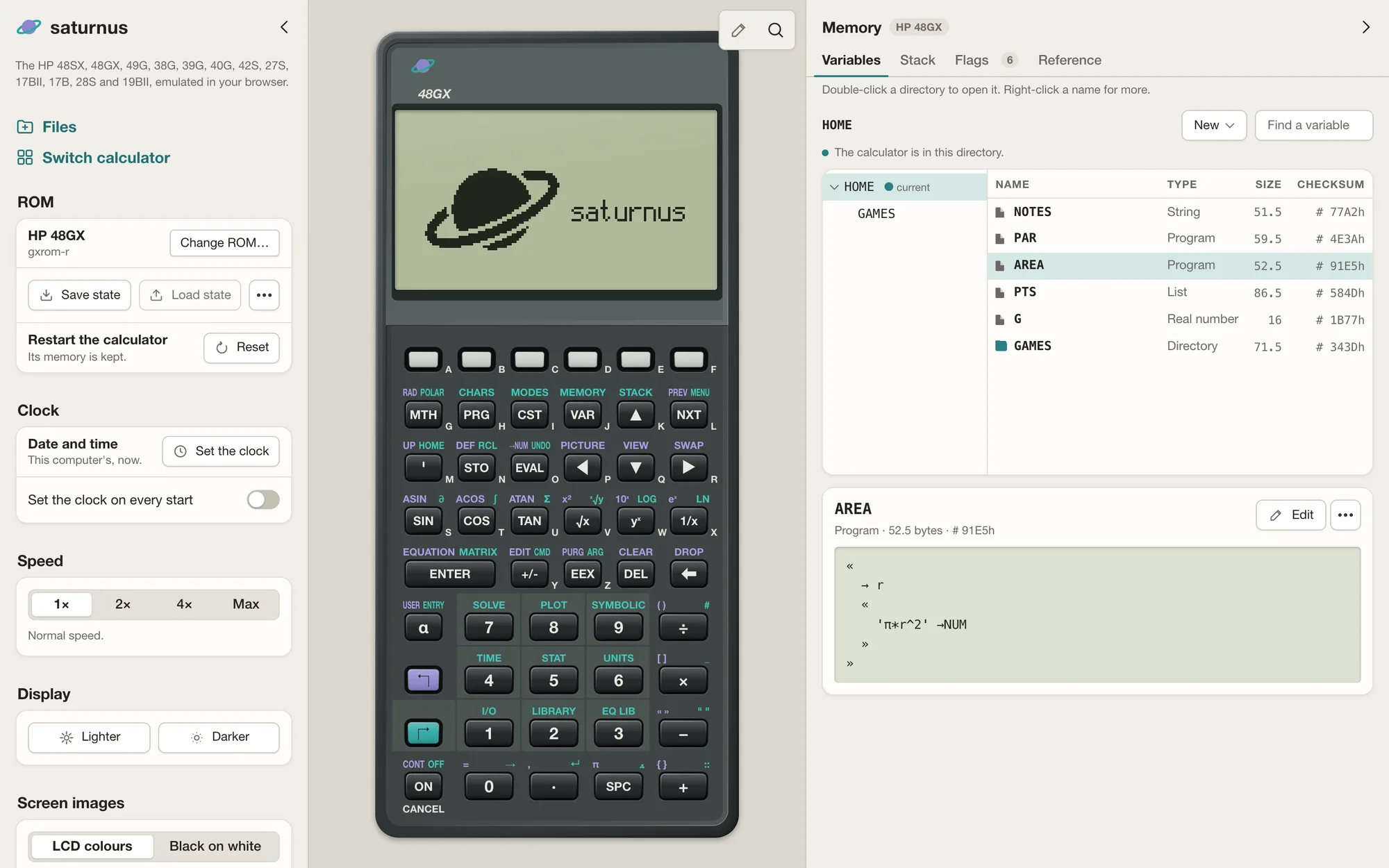
The memory view shows the variables, directories, stack and flags, read live from the calculator's RAM. Store, rename and delete variables or set flags there, and the calculator makes each change itself.
-
Edit programs
Open a variable or a stack level in an RPL editor with highlighting, indentation and completion. The calculator itself checks what you save, so a syntax error shows its own message.
-
Look up any command
Search (Cmd+K or Ctrl+K) finds every command of every model, with examples run in saturnus. Enter runs the command on the calculator; on the 38G, 39G and 40G it goes on the edit line for you to finish.
-
Keep your work
The calculator keeps its memory across reloads, as a real one does when switched off. Save and load states, and copy or save the screen as a PNG.
-
Real speed, or faster
Programs take as long as on the real calculator, within a few percent. Switch to 2×, 4× or Max for a long one.
The memory view, the editor and pasting work on the 48SX, 48GX and 49G.
Install
Web: nothing to install
Open saturnus in a browser. It works offline after the first visit and can be added to a phone's home screen to install it.
You need your model's ROM: download it from hpcalc.org (opens in a new tab) (the app links each model's page), unzip it, and choose the file or drop it onto the page. A ROM you already have works the same way. The browser keeps it, so you choose it only once, and the ROM and your work never leave your device.
Desktop app
For Macs with Apple silicon (also with Homebrew), and for Windows and Linux on Intel, AMD or ARM processors.
# macOS, Homebrew
brew trust --cask ractive/tap/saturnus-app
brew install --cask ractive/tap/saturnus-app
Also: Windows on ARM · Linux and more under all downloads (opens in a new tab)
If Windows says "Windows protected your PC", click "More info", then "Run anyway".
Command-line tools
Two programs without a window:
- saturnus runs a calculator from its ROM in the terminal: it presses keys listed in a text file, saves the screen as text or a PNG, opens its serial port to other programs and looks up commands. It is made for automated tests and scripts, not for using a calculator by hand: for that, use the web or desktop app.
- satx sends and receives files with a real HP 48 or 49 over a serial cable, by Kermit or XModem, and with a calculator running in saturnus the same way.
# Rust
cargo install saturnus satx
# macOS and Linux, Homebrew
brew trust --formula ractive/tap/saturnus
brew trust --formula ractive/tap/satx
brew install ractive/tap/saturnus ractive/tap/satx
# Windows, Scoop
scoop bucket add ractive https://github.com/ractive/scoop-bucket
scoop install saturnus satx
Also as archives, .deb and .rpm on the releases page (opens in a new tab) (the packages saturnus and satx).
The ROMs are not included
saturnus runs the calculator's own ROM, which is HP's software. hpcalc.org (opens in a new tab) hosts the ROM files with HP's permission for use with emulators, and saturnus does not host or pass them on. Download the ROM for your model there, unzip it and drop the file into the app; the desktop app and saturnus rom fetch download it for you. The 42S, 27S, 17BII, 17B and 28S ROMs were never published, but you can read the ROM out of your own calculator with an HP 48 as the infrared receiver: Christoph Gießelink's Emu42 page (opens in a new tab) points to the tools and the steps. The 19BII's was never published either and cannot be read out: saturnus runs it only from a file you already have.
File transfer
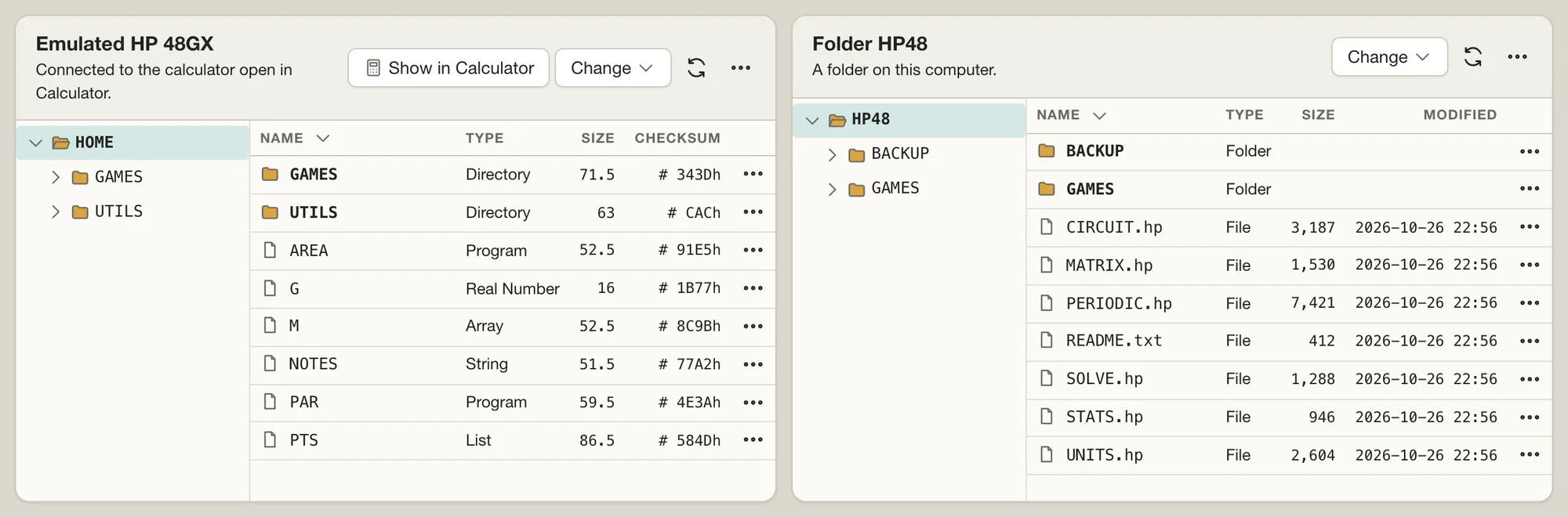
The app's Files view moves files between a calculator and your computer: an emulated one running in the app, or a real HP 48 or 49 on a serial cable (in Chrome or Edge on a computer). Copy files both ways, back up the whole memory, or serve a folder to a 38G, 39G or 40G. On the command line, satx does the same.
AI apps
Let an AI app such as Claude, ChatGPT, Claude Code, Codex or Cursor use the calculators you have open in saturnus: it reads the display, presses keys, runs RPL, stores programs on the 48 and 49 models and looks up commands. You see each key it presses on the calculator, and the app asks you before its tools store or delete a variable. To start, choose Connect your AI app… in the app. In the browser the connection goes through tab-mcp (opens in a new tab), an open-source relay that lets a web page offer tools to AI apps, so any AI app can connect, Claude and ChatGPT included. In the desktop app the connection stays on your computer, so only AI apps on the same computer can use it.
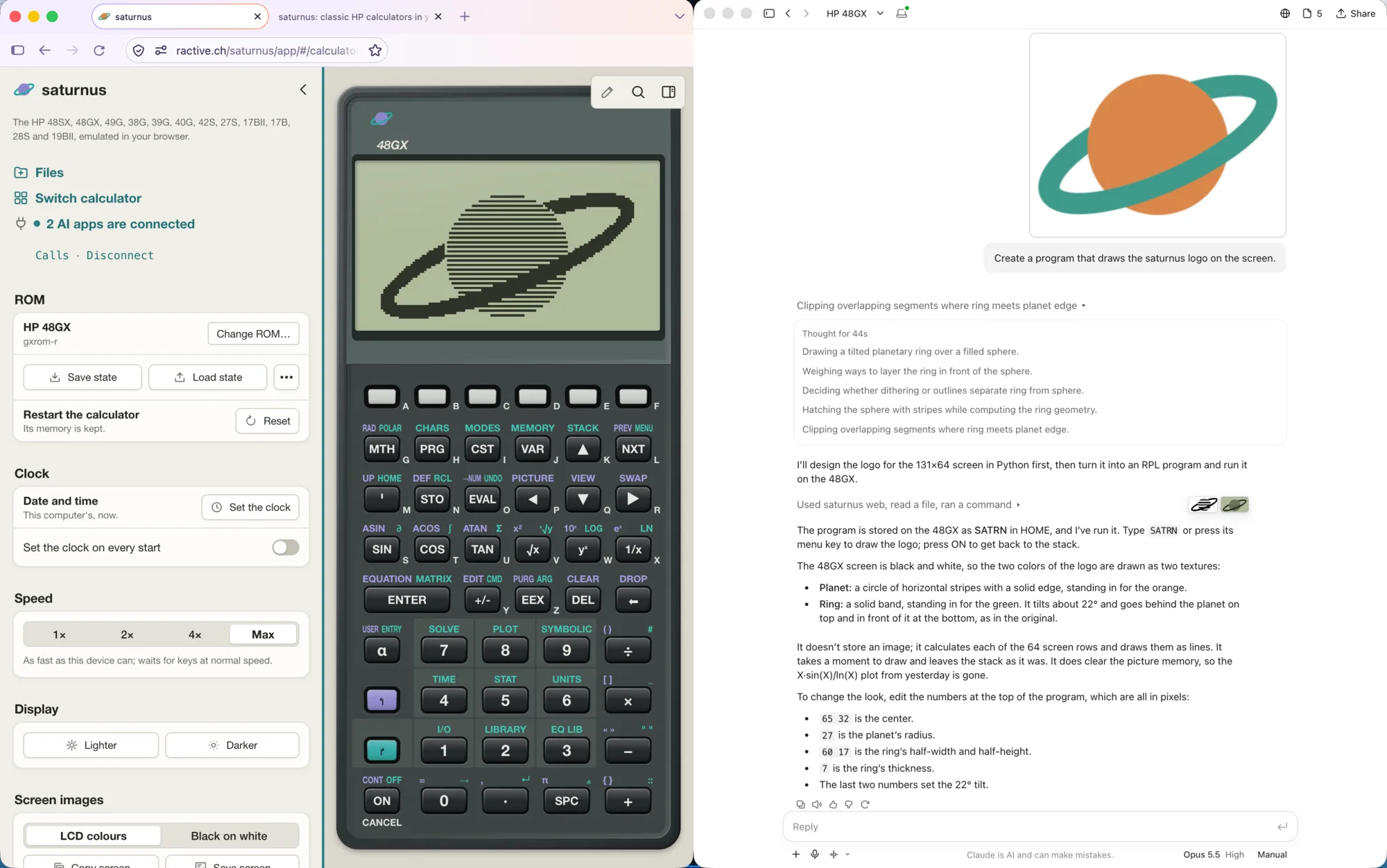
In the picture: asked to draw the saturnus logo, Claude writes an RPL program, stores it on the emulated HP 48GX as SATRN and runs it.
Written from the documentation
saturnus was written from HP's manuals, the hardware literature and the behaviour of the ROMs themselves, not from other emulators' source code. Every fact it relies on is in a public knowledge base with its source: the Saturn CPU, the display, the timers, the serial port, the memory layout and the transfer protocols. The docs tell what was learned along the way: each model's history, every command with examples, how the Saturn processor works and how files reach a real calculator.
Docs Knowledge base (opens in a new tab) Source code (MIT) (opens in a new tab) Changelog (opens in a new tab)