HP 38G
The HP 38G is a graphing calculator for secondary school maths and science that Hewlett-Packard introduced in April 1995. It runs on the hardware and much of the software of the HP 48G, but with algebraic entry and a simpler design built around aplets: small applications for one topic that a teacher can beam to the whole class.
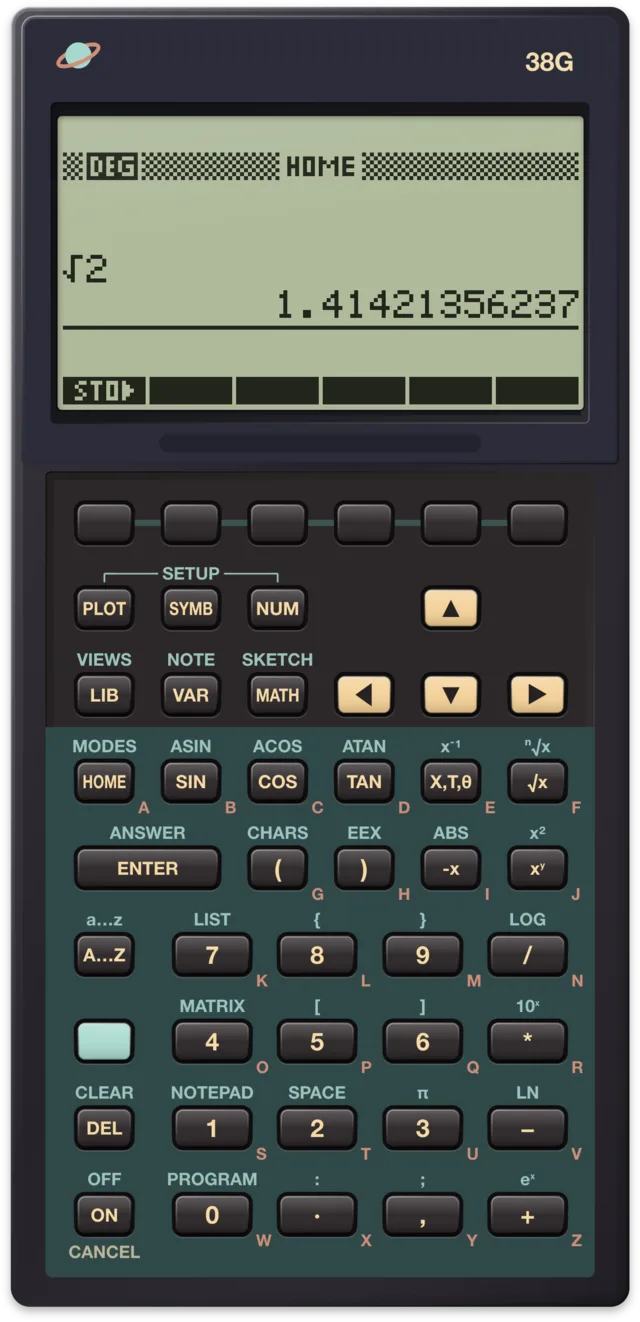
At a glance
| Introduced | 6 April 1995, at $79.95 |
| Code name | Elsie |
| Processor | Saturn core in HP's Yorke chip, 4 MHz, as in the 48G |
| Memory | 32 KB RAM (about 22 KB free), 512 KB ROM |
| Display | 131 × 64 pixels, 8 lines of 22 characters |
| Keyboard | 47 keys: the 48's with two taken out |
| Entry | Algebraic only, no RPN |
| Input and output | Two-way infrared; serial port on a 10-pin connector that also drives an overhead display; beeper |
| Power | Three AAA cells |
| ROM | A1.67 in the first calculators |
| Successors | HP 39G and HP 40G, 2000 |
History
Designed with teachers
HP set out to make a graphing calculator for students before calculus and their teachers. To help, it formed an Education Advisory Committee of eight teachers from high schools, community colleges and universities. The team met them every few months and kept in touch by email in between.
The teachers wanted students to explore mathematical ideas, but they also needed to keep them on track. At the first meeting the two sides compared this to a child's sandbox: toys to play with, inside a safe, closed space. So one of the main design goals was to encourage exploration by limiting choices. That led to the aplet, a small application that focuses on one problem. Finseth's data sheet gives the name as short for "Animated Personal LEarning Tool".
Built on the 48G
The 38G reuses the HP 48GX's platform. The HP Journal article on it, from June 1996, lists what the two share: the same processor, 32 KB of RAM, 512 KB of ROM, the same 131 × 64 display, two-way infrared and an RS-232 link. The input forms and choose boxes that made the 48G easier to learn run the 38G's views too. But the 38G is not an HP 48: it has no RPN and runs no HP 48 programs.
The case is the 48's, redesigned. A sliding plastic cover makes it tougher for younger students. Two keys were removed, so that the arrow keys stand out and the keyboard looks less complicated. HP's overhead projector display already worked with the 48G, but on the 38G the connector was changed so that every 38G can drive it, with no special calculator needed.
Oregon and Singapore
The 38G was the first product of HP's Asia Pacific Personal Computer Division, after the charter for handheld products moved there from Corvallis, Oregon. The software team was split between Oregon and Singapore, more than 9,000 miles and eight time zones apart. The HP Journal describes how they worked: "virtual team meetings" with headsets and a shared document on every screen, and a project web page that collected email discussions, plans and test documents. In 1995 that was new.
Launch and price
According to Finseth's data sheet, HP announced the 38G on 6 April 1995 at the 75th annual conference of the National Council of Teachers of Mathematics in Boston, with a special edition made for the event. HP's virtual museum gives its price as $79.95; Finseth lists $118. The code name was Elsie, after a cow in a food company's advertising. Among the 38G's firsts the data sheet counts the hard cover, the split screen, aplets, implied multiplication and the table view of equations.
A 38G+ was prototyped and cancelled in 1998. In 2000 the HP 39G and, in Europe and other markets, the HP 40G replaced the 38G.
What makes it special
Aplets and views
The design of aplets follows the "three views" of the National Council of Teachers of Mathematics: a problem can be seen as a graph, as symbols or as a table of numbers. Three keys open them: PLOT, SYMB and NUM. VIEWS offers more, such as a split screen with the plot beside its table. Each view has a setup screen, and a note view and a sketch view let you add text and drawings to a problem.
Six aplet types are built in: function, parametric, polar, sequence, statistics and solve. At first they are empty. You add the equations, settings, notes and sketches, and save the result under its own name. Each aplet keeps its own settings, so switching from one to another disturbs neither. LIB opens the library of aplets.
James Donnelly's article in the same HP Journal starts with the function SIN(X²)/X: put it in the function aplet, zoom into the plot, and the aplet now holds that function, its scales and its modes. Send it to another 38G, and it opens there exactly as it was saved.
A class with one setup
A teacher can build an aplet on the calculator, or on a computer, and beam it by infrared to every student's 38G. HP's virtual museum describes the point: at the start of a lesson, every calculator in the room is set up the same way. Students explore within the aplet on their own and can send their work back. A 38G can also save aplets to a computer over its serial cable, so teachers could share them online. On the PC, HP's Connectivity Kit for the 38G came with HPComm38, later HPGComm, a Windows program by the author of saturnus and Mitch Davis of HP.
HOME, Ans and help for beginners
Calculations are done in the HOME view, which keeps a history you can scroll. Each result is stored in a variable named Ans. Start an entry with +, −, × or ÷ and the calculator puts Ans in front; press ENTER on an empty line and it repeats the last entry. The HP Journal's example is balancing a chequebook.
To help beginners, a fraction format turns results into fractions, and the 38G reads a missing multiplication sign as implied multiplication. Most variables have a fixed type: X holds a real number, Z1 a complex number, M2 a matrix, with ten variables in each group.
Plots
The 38G draws function, polar and parametric plots, sequences as stairstep and cobweb diagrams, and statistics as histograms, scatter plots and box-and-whisker plots. Tables can sit beside a plot, and tracing a curve shows its values.
Hidden things
Finseth's data sheet lists some undocumented features: pressing ON and PLOT together copies the screen into a graphic variable, and the case cover has the number 6.0030000004 moulded into it.
In saturnus
saturnus runs the 38G with ROM A1.67:
- The saturnng emulator, which saturnus compares its screens with on the 48 and 49 models, does not run the 38G. Where a result looked wrong, it was checked on a real 38G. ACOT is one: it ignores the angle mode, so ACOT(1) gives .785398163397 in degrees, where 45 is right. A real 38G does the same, so it is the ROM, and the command reference notes it.
- The speed is set as for the 48GX, which has the same chip; no real 38G has been timed for it. For long programs, switch to 2×, 4× or Max.
- Files can serve a folder to the 38G as the "disk drive" it sends aplets to and receives them from: on the calculator, LIB, then SEND or RECV, and "Disk drive". It works with the emulated 38G. With a real 38G on its 10-pin cable (in Chrome or Edge on a computer) it has not been tried yet.
- The infrared port is not emulated, so beaming an aplet to another 38G is not possible.
- There is no memory view for the 38G; it exists for the 48SX, 48GX and 49G.
The command reference lists the 38G's 208 functions with the keys that run them, and examples for 121 of them, run in saturnus.
Sources
- Hewlett-Packard Journal, June 1996: "A Graphing Calculator for Mathematics and Science Classes" by Ted W. Beers, Diana K. Byrne, James A. Donnelly, Robert W. Jones and Feng Yuan (the teachers' committee, the sandbox, aplets and the three views, the hardware shared with the 48G, the case and the removed keys, the overhead display, the plot types, Ans, fractions, implied multiplication, typed variables, the team in Oregon and Singapore); "Creating HP 38G Aplets" by James A. Donnelly (the SIN(X²)/X example).
- HP Virtual Museum: HP 38G: the year and price, the eight teachers, aplets beamed to a class, the sliding cover.
- Finseth's HP calculator data: HP 38G: the date and place of the introduction, the list price, the code name, the chips, memory, display and input and output, the ROM version, the firsts, the meaning of "aplet", the screen copy and the number on the cover.
- Wikipedia: HP 38G: the cancelled 38G+, the 39G and 40G as successors.
- HPComm, the archive on GitHub: HPComm38 and HPGComm in HP's Connectivity Kit.