HP 19BII
The HP 19BII is a business calculator that Hewlett-Packard introduced in January 1990, the Business Consultant II. Its case opens like a book: a letter keyboard on the left, the calculator keys and a four-line display on the right. It has money calculations, statistics, a clock with appointments, a solver for your own equations and lists of text, in six languages. It was HP's last calculator in this kind of case.
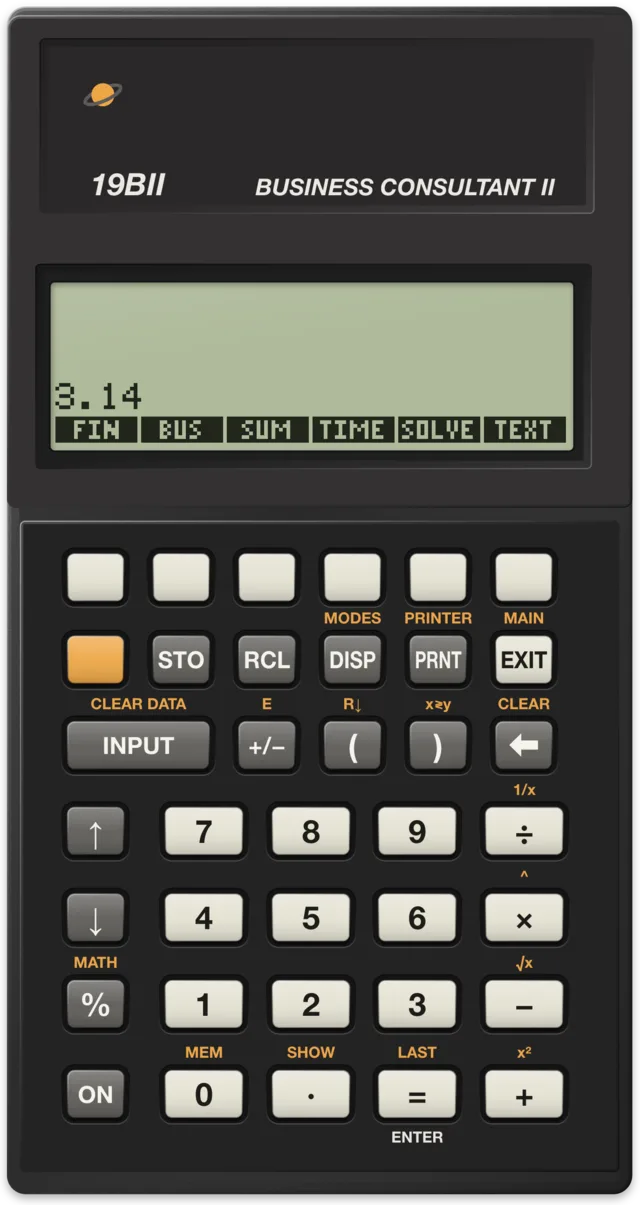
At a glance
| Released | January 1990, at $175 |
| Discontinued | Before 2003 |
| Product number | F1639A |
| Processor | Saturn core in HP's Lewis chips, about 1 MHz |
| Memory | 8 KB RAM (about 6,600 bytes for you) |
| Display | Four lines of 23 characters |
| Keyboard | A letter keyboard on the left half, the calculator keys on the right |
| Entry | Algebraic in chain order, or RPN |
| Input and output | Infrared output to HP's 82240 printers, beeper |
| Clock | Time, date and appointments |
| Languages | Six |
| Power | Three N cells |
| Size | 15.9 × 9.4 × 1.8 cm closed, 18.9 cm wide open |
History
The Business Consultant
The 19BII's story starts with the HP 18C Business Consultant of June 1986. Susan L. Wechsler's article in the Hewlett-Packard Journal of August 1987 tells how HP designed it. The HP-12C sold well, so its features met customers' needs, but HP wanted them easier to use. It held focus panels on both coasts of North America and asked its sales representatives abroad.
Many people disliked keyboards cluttered with labels. Instead of cutting functions, HP added keys: real ones, with a second keyboard in a case that opens like a book, and virtual ones, six blank keys under the display whose labels the display shows. The 18C was HP's first menu-driven calculator. Because it used the CPU of the HP-71B handheld computer, its financial calculations ran at least 15 times faster than the HP-12C's.
HP Solve
The 18C introduced Solve: type in an equation with any names you like, and the menu keys show its variables. Store values in all but one, press the key of the last, and the calculator works it out. The idea came from Chris Bunsen, who tells in the same journal issue how he worked it out one evening after midnight, to escape the boredom of debugging a software package for the HP-71B. The HP-12C's financial keys showed him the way: one key per variable, to store a value or calculate it. A row of menu keys under a display could do the same for any equation.
Speaking the user's language
Feedback from outside the United States asked for a calculator in the user's own language. HP put every message and menu label into a single table, so nothing could be missed in translation, and kept the table inside one of the two ROM chips, so that a new language meant replacing one chip. By August 1987 the 18C had been localised in German, French, Italian and Spanish.
The 19B and the 19BII
On 4 January 1988 HP replaced the 18C with the 19B, at the same $175, launched together with the 17B, the 27S and the 28S. The 19B carried the name Business Consultant II and added text lists and a choice of languages in one calculator.
In January 1990 the 19BII followed, again at $175. It added RPN beside algebraic entry; together with the 17BII of the same month it was the first HP calculator to offer both. Finseth's data lists it as the last of HP's clamshell calculators.
The clamshell's weak points
The 28C, 28S and 19B share a known problem. Wikipedia describes how the springs of the three N cells press the battery lid against thin notches in the case, which crack. The 19BII fixed this by putting the battery cover underneath the chassis. Wikipedia also notes that the ribbon connecting the two keyboards could fail after many openings.
Early 19BIIs also had an RPN bug, the same as early 17BIIs: change a number's sign with +/−, swap with x≷y, type a digit, and a minus sign appears that is not really there. Trying to delete it could clear the stack, or even lose the whole memory. HP removed the bug early in 1991.
RPL inside
Christoph Gießelink, author of the Emu42 emulator, wrote in 2003 that the 19BII offers no RPL programming to its user, but that many parts of it are written in RPL internally. Its hardware is very close to the 28S's; only its 8 KB RAM chip sits at a different address.
What makes it special
Menus on four lines
The main menu shows FIN, BUS, SUM, TIME, SOLVE and TEXT. Each leads to menus whose keys store and calculate: key in a number and press a variable's menu key to store it, or press the key alone to calculate it.
- FIN: time value of money for loans, savings and leasing, interest conversions, cash flows with net present value and internal rate of return, bonds and depreciation.
- BUS: percent change, percent of total, markup, currency exchange and unit conversions.
- SUM: running totals, statistics, histograms, curve fitting, forecasting and plots of x,y data.
- TIME: the clock, a calendar, appointments with alarms and date arithmetic.
- SOLVE: your own equations, each with a menu of its variables.
- TEXT: lists of notes, which you can sort, edit, name and print.
The letter keyboard
The left half holds the letters, so equation names, variable names and text go in directly, without menus of characters. Together with the four-line display, this is what sets the 19BII apart from the pocket-sized 17BII.
Six languages and currencies
The INTL menu under MODES switches between six display languages. The currency exchange menu converts between two currencies at a rate you store or calculate; the manual's example still uses West German marks and British pounds.
In saturnus
saturnus runs the 19BII on the same two-chip machine as the 28S, with 8 KB of RAM:
- It draws the calculator open, the letter half beside the display half; on a phone or a tall window the halves stack.
- On a first start it asks for the language, then boots and computes.
- Its display is 137 pixels wide, as the 28S's: the six menu labels fill exactly that width.
- "Set the clock" sets the 19BII's clock to your computer's time, by pressing the keys of its TIME menu as you would. Appointment alarms have not been tested.
- On your computer's keyboard, F1 to F6 press the menu keys.
- The CPU runs at 1 MHz, the figure the sources give for its chips. No timing of a real 19BII has been measured to check it against, so run times are an estimate. 2×, 4× and Max speed it up.
- Save and load states work as on every model.
What it does not do: the 19BII has no serial port, so Files has nothing for it, and the infrared printer output is not emulated. The memory view and the RPL editor are for the HP 48 and 49 only.
The command reference lists the 19BII's 418 functions with the keys that run them, and examples for 148 of them, run in saturnus.
Sources
- HP 19BII Owner's Manual: the main menu and what each part does, six languages, about 6,600 bytes of memory, TEXT, currency exchange, the edition dates.
- Hewlett-Packard Journal, August 1987: Susan L. Wechsler, "A Handheld Business Consultant" (the HP-12C's influence, focus panels, the clamshell and softkeys, HP's first menu-driven calculator, the speed, localisation); Chris Bunsen's sidebar on the Solve interface.
- Finseth's HP calculator data: HP 19BII: date and price, the first dual-logic and last clamshell calculator, the RPN bug and its fix, Gießelink's note on RPL inside and the 28S hardware.
- Finseth's HP calculator data: HP 19B: the 19B's date, price and firsts, display, processor, power, memory.
- Finseth's HP calculator data: HP 18C: the 18C's date and price.
- Wikipedia: HP-19B: the launch with three others, the 19BII's product number and date, size, the battery door and the ribbon, the printers.
- Wikipedia: HP-28 series: the battery cover and its fix on the 19BII.